[EDI] How do I find the current firmware version on my MMU2 monitor?
This article discusses how to find the firmware version loaded on your MMU2 monitor.
To find out which firmware version your monitor is using, follow the steps below.
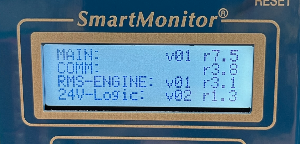
- Navigate to Menu —> Set/View Config —> Firmware Version
Current firmware is listed under the heading MAIN:
- v = version
- r = revision
|
|
|